


| At a glance | |
|---|---|
| Product | TP-LINK Ultimate Wireless N Gigabit Router (TL-WR1043ND) [Website] |
| Summary | Bargain-priced Gigabit-port 2.4 GHz N router based on Atheros chipset with FTP/UPnP USB drive sharing. |
| Pros | • Relatively inexpensive for a Gigabit four port router • In and outbound bandwidth limiting • Upgradeable antennas • WDS support |
| Cons | • No SMB drive sharing • Unimpressive wireless uplink performance • No Guest WLAN |
Typical Price: $70 Buy From Amazon
Overview
This is our first review of a product from TP-LINK. The company aims squarely at the value-conscious consumer, with products typically priced below functional equivalents from their better-known competitors. TP-LINK says it has decided to make a bigger grab for the U.S. market, so let’s see what they have to offer.
The TL-WR1043ND represents the top-end of the company’s 300 Mbps Wireless N line. Given that position, it’s odd that the router is only single band. But like most other top-end routers, the TL-WR1043ND has Gigabit Ethernet ports for both its single WAN and four switched LAN ports.
A glance at the front and rear panel callouts in Figure 1 shows the product is strictly old-school when it comes to indicator lights—of which it has plenty—and antenna configuration. The three 3dBi antennas are all external and screw on via RP-SMA connectors.
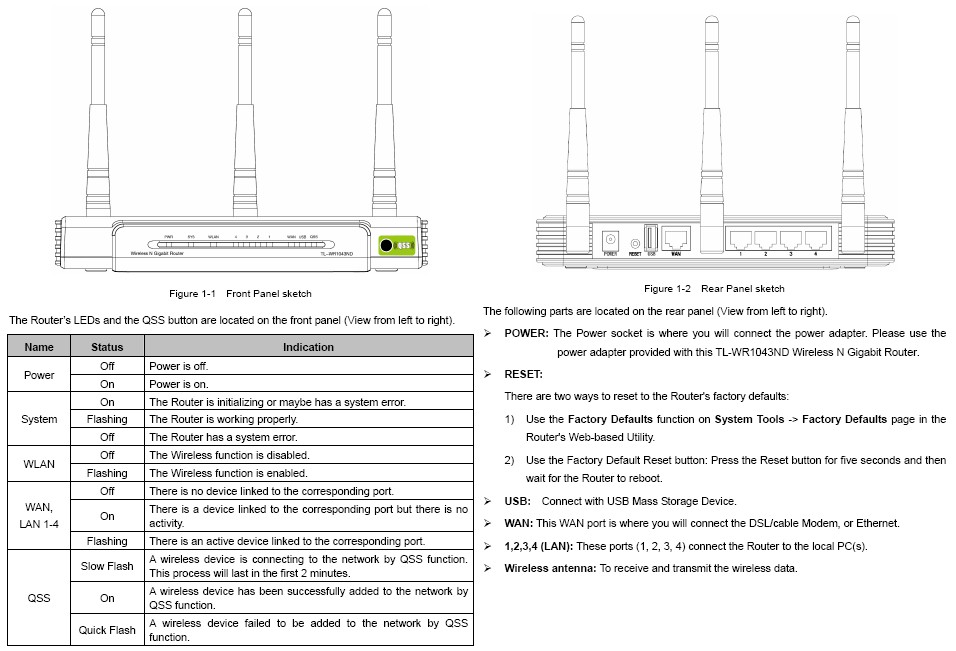
Figure 1: Ports and indicators
Inside
The FCC ID photos are detailed enough that I didn’t open up the product to take my own. Figure 2 is an internal view, showing the router still in its case.
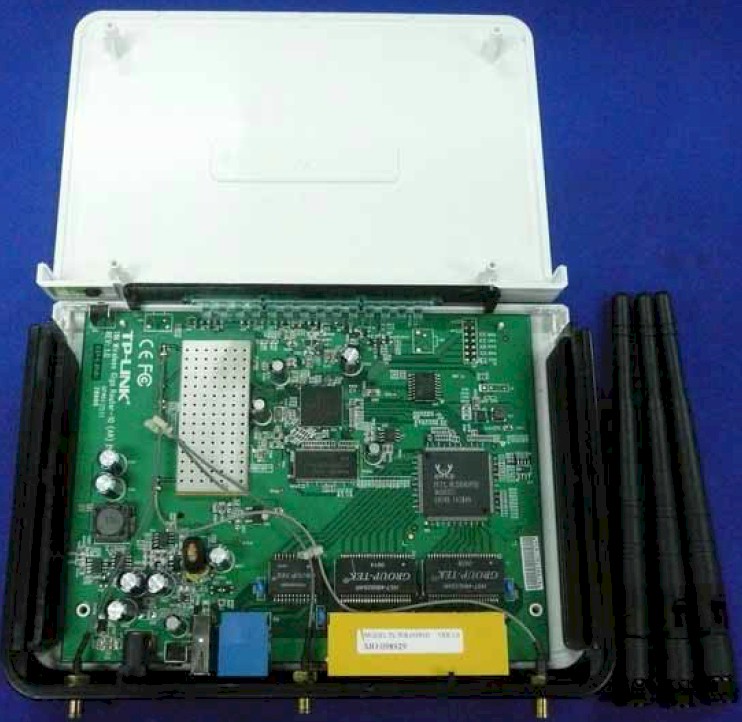
Figure 2: TL-WR1043ND inside
The closer view of the board in Figure 3 was still fuzzy for identifying all the components. But some web searching quickly revealed the key components, which I’ve documented in Table 1. 
| TL-WR1043ND | WZR-HP-G300NH | |
|---|---|---|
| CPU | Atheros AR9132 | Atheros AR9132 |
| Switch | Realtek RTL8366RB | Realtek RTL8366SR |
| RAM | 32 MB | 64 MB |
| Flash | 8 MB | 32 MB |
| 2.4 GHz Radio | Atheros AR9103 | Atheros AR9103 |
Table 1:Component comparison
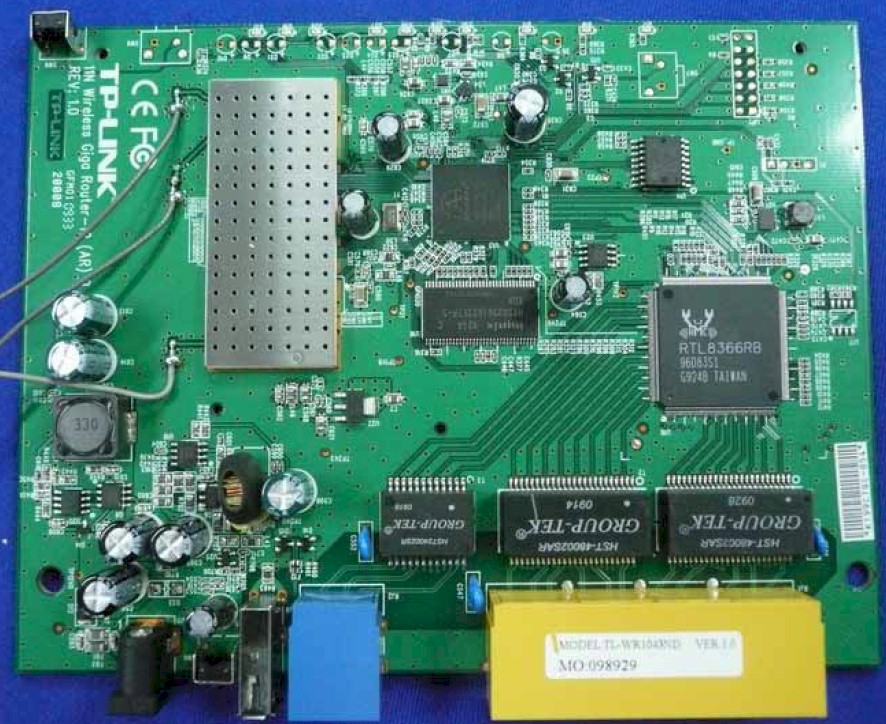
Figure 3: Cisco X2000 inside view
In keeping with TP-LINK’s low-cost focus, the design is relatively dated and is very similar to Buffalo’s WZR-HP-G300NH Nfiniti Wireless-N High Power Router & Access Point, which dates from 2009.
Features
Since this is our first dance with a TP-LINK router, I’m going to have Craig do a full feature review on it. In the meantime, Figure 4 provides a taste of the GUI, which isn’t fancy, but gets the job done.
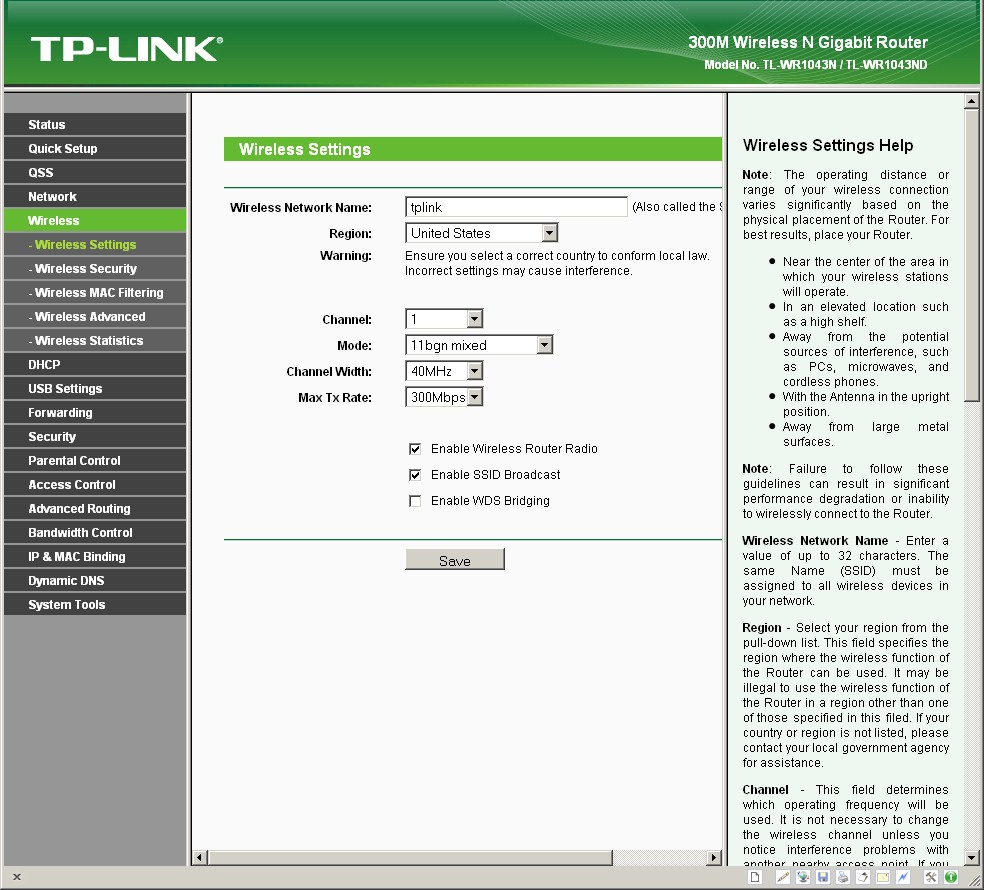
Figure 4: Wireless settings
If you’re looking for IPv6 support or multiple SSIDs/Guest wireless, the TL-WR1043ND will disappoint. But if you’re looking for WDS bridging/repeating or up and downlink bandwidth controls by IP and service port, you’ll be happy.
Routing Performance
Routing throughput running the latest 3.13.4 Build 110429 Rel.36959n firmware and our router test process measured 123 Mbps WAN to LAN, 113 Mbps LAN to WAN and 121 Mbps total with up and down tests running simultaneously. The IxChariot composite plot in Figure 5 shows download gets a bit more throughput than upload in the simultaneous routing test.
The maximum simultaneous connections test yielded only 5,109 connections, with the router locking up temporarily after that limit was reached. I didn’t have to reboot to get things moving again, but just had to wait a bit for some of the sessions to die off.
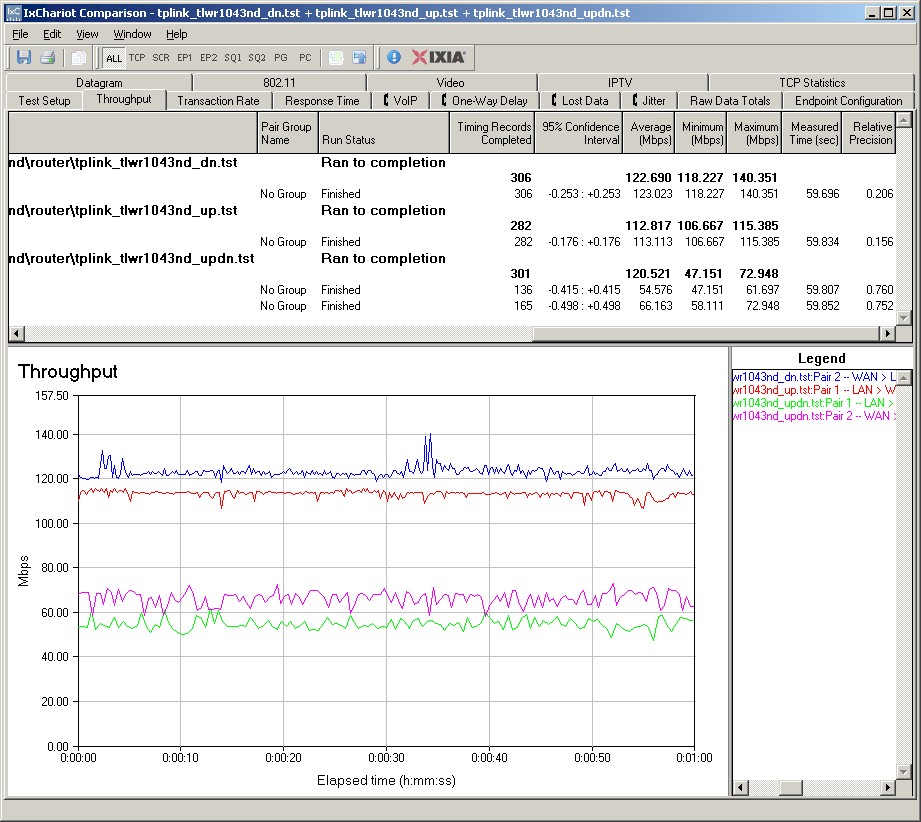
Figure 5: Wired routing performance summary
Wireless Performance
The TL-WR1043ND is Wi-Fi Certified but did not properly default to 20 MHz bandwidth mode on power-up. I successfully ran a Wi-Fi Protected Setup (WPS) session with my Win 7 client by entering the WPS code found on the router’s bottom label. The WPS session completed quickly and resulted in a WPA2/AES secured connection. All tests were run with this secured connection using our latest wireless test process.
Because of the problems we found using our standard Intel 5300 test client with only two antennas connected, we’ve made a change in standard test client. We’re now using an Intel Centrino Ultimate-N 6300 in a Lenovo x220i notebook running Win 7 Home Premium. This client will be used for all wireless testing, except when we need to run dual-stream tests on three-stream routers/APs. In that case, we’ll use the previous standard Acer Aspire 1810T notebook that also runs Win 7 Home Premium. But it now has a proper dual-stream N client installed, an Intel Centrino Advanced-N 6200.
I filtered the default 2.4 GHz downlink benchmark chart to show only single-band routers. Figure 6 shows that the TL-WR1043ND doesn’t do too badly. But its ranking in the uplink benchmarks is much lower, falling to the lower half of the rankings.
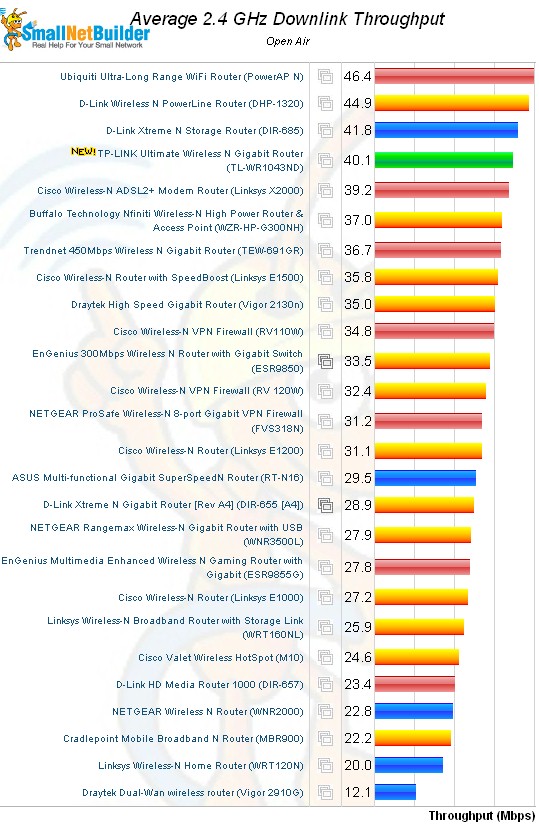
Figure 6: Average 2.4 GHz Downlink Throughput
For a comparative look, I chose two other inexpensive single-band routers with Gigabit ports, the EnGenius ESR9850 and Buffalo WZR-HP-G300NH. Figure 7 shows only occasional wins for the TP-LINK, both for downlink and both in mid-level signal test locations.
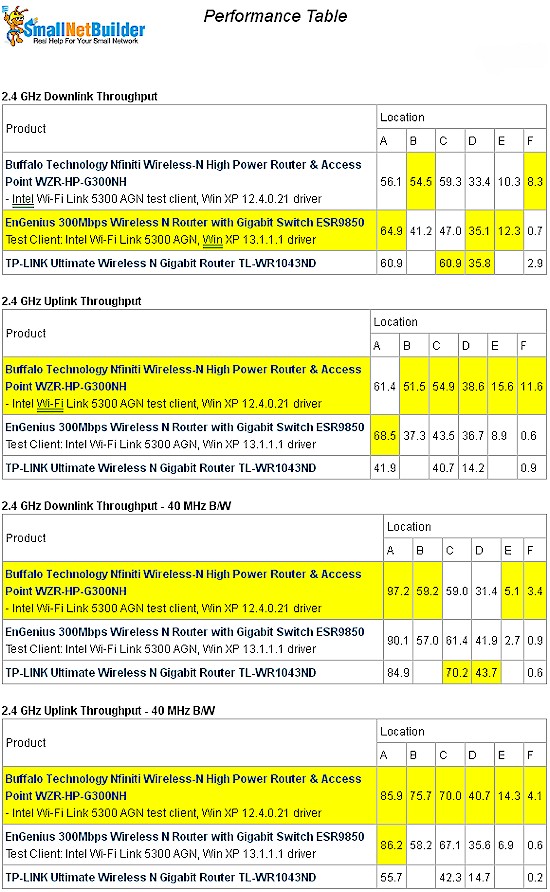
Figure 7: Wireless Performance Comparison
You can see overall poor uplink performance and also that throughput is very low in the weakest signal test location F. Highest throughput of 85 Mbps was measured in Location A, in 40 MHz mode running downlink. I was able to measure 98 Mbps of total throughput in a Location A simultaneous up/down test using 40 MHz bandwidth mode.
The bottom line is that this is not a router that is going to provide exceptional uplink performance, nor will it be especially helpful for extending your wireless range.
The IxChariot plot in Figure 8 shows relatively stable throughput, which was generally the case.
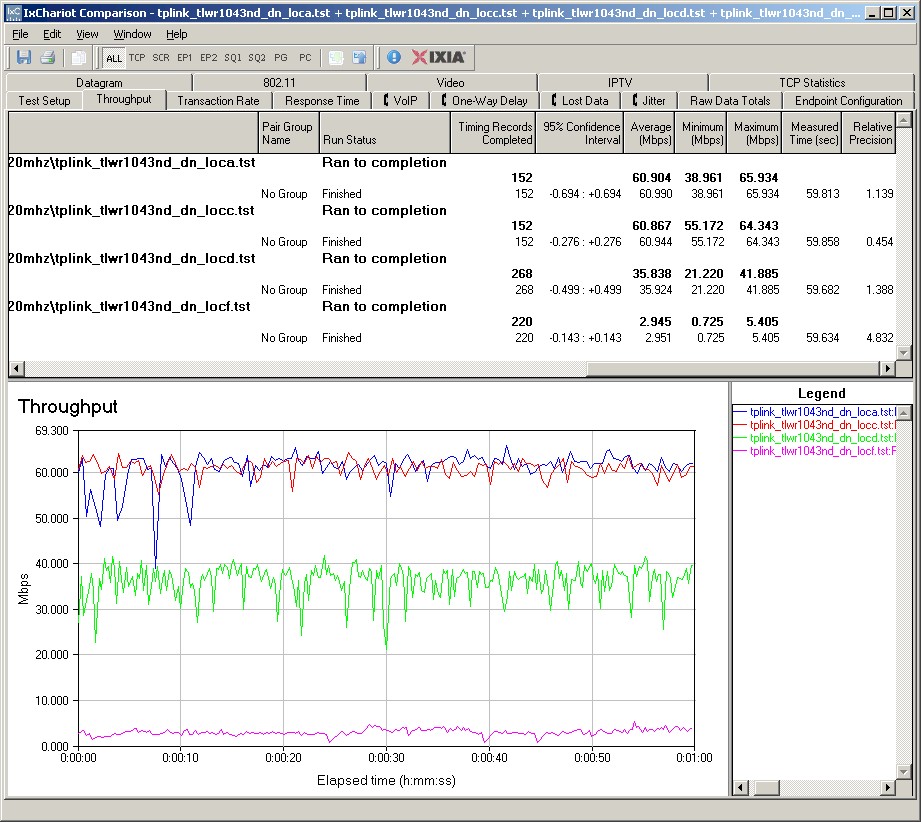
Figure 8: IxChariot plot – 2.4 GHz, 20 MHz, downlink
Here are links to the other 2.4 GHz plots for your reference:
- 2.4 GHz / 20 MHz uplink
- 2.4 GHz / 20 MHz up and downlink
- 2.4 GHz / 40 MHz downlink
- 2.4 GHz / 40 MHz uplink
- 2.4 GHz / 40 MHz up and downlink
Closing Thoughts
For a top-of-line router, the TL-WR1043ND’s performance isn’t particularly impressive. But for a $55 single-band N router with Gigabit ports, it isn’t too bad. Be sure to hit Craig’s full feature review and use the Router Charts and all the benchmarks therein and the Router Finder to further explore its performance and features.