

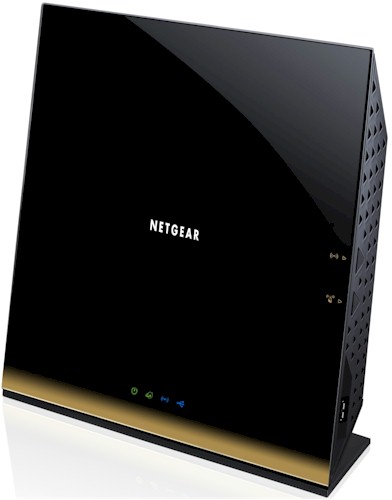
| At a glance | |
|---|---|
| Product | NETGEAR WiFi Router – 802.11ac Dual Band Gigabit (R6300) [Website] |
| Summary | Broadcom-based simultaneous dual-band AC1750 class Draft 2.0 802.11ac router |
| Pros | • Has WDS, Client Bridge and AP modes • Can reach almost 500 Mbps total 11ac throughput |
| Cons | • No site survey in client bridge mode • Can’t adjust transmit power |
Typical Price: $128 Buy From Amazon
Preface
Since NETGEAR was vague about when review samples would be available for its brandie-new draft 802.11ac router, I put my pre-order in for two with Amazon. They arrived on Wednesday and I spent part of Thursday running some preliminary tests.
There has been some moaning in Amazon reviews and in the NETGEAR forum about performance with non-draft 11ac clients. So I took a different approach from my initial testing of Buffalo’s WZR-D1800H draft 11ac router and ran full two-stream tests in both bands. I also ran the multiple-pair maximum throughput tests I ran for the Buffalo to see if throughput similarly scaled with traffic load.
A full review will follow in the next week or so, after NETGEAR releases a rumored firmware release. But, given the interest in the product, I wanted to get some performance data up quickly so that early adopters can get a brain cramp trying to decide between Buffalo and NETGEAR.
First, though, some advice to those thinking of buying this or any other draft 11ac product in hope of improving your wireless LAN range—DON’T. Like 802.11n before it, 802.11ac’s focus is on providing increased bandwidth. It does this primarily by chewing up more channels and by adding higher link rates for mobile devices that can fit only one antenna into their compact enclosures.
The only thing in the draft 802.11ac technologies that might provide better range is standardized beam-forming, to replace the various incompatible methods used today. But this will help only when clients are introduced that implement the new beam-forming standard. There will be no improvement for current 802.11n devices. See Why 802.11ac Will Kill The 5 GHz Wi-Fi Band for more on this.
Now, if you are starting from an old 802.11g router and considering an upgrade, you will definitely see a throughput improvement if you also upgrade your clients to 802.11n. You may also see range improvement. But most range improvement is coming from the advances in wireless chip technology and improved receive sensitivity that have occured since 802.11g was the new kid on the wireless block.
And one more thing for those who are shocked, shocked (!) to find that the initial crop of draft 11ac routers have bugs and features missing from current-generation products. Get over it! These products are being rushed to market in hopes of proving how fashion-forward their makers are. Hell, the techology they are based on is still in draft form, so what do you expect?
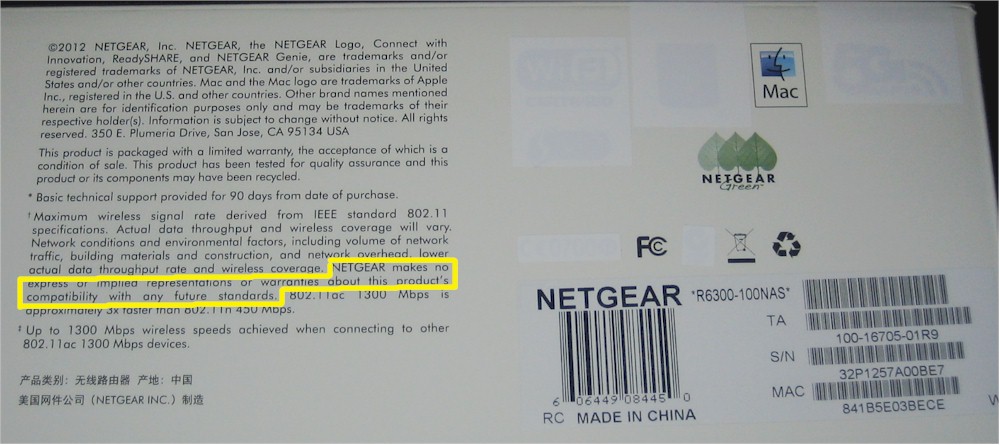
So, if you choose to buy one, stop your whining and behave like a brave early-adopter. Suck it up, politely file your bug reports and perform the role you chose to play—helping develop the product and technology by being a beta tester…and paying for the privilege! And be sure to note the covered-over Wi-Fi and other Certification logos on the R6300’s product box and this note in the box fine print: "NETGEAR makes no express or implied representations or warranties about this product’s compatibility with any future standards".
Proceed with caution
Highlights
You’ll be surprised at how large the R6300 is: around 10 inches wide and a bit over 8 inches tall. The gold styling cue on the bottom edge conveys sort of a horizon effect with a white NETGEAR logo floating in space. As long as your spouse doesn’t object to black, there should be no battles over having the R6300 out in plain sight.
There are only power, Internet, Wireless and USB status indicators on the front panel and no link or activity indicators for wired network traffic on either the front panel or rear panel switch ports. All ports are 10/100/1000 Mbps and there are two USB 2.0 ports–one on the rear and the other on the right side.
The R6300 is intended to sit on a table on its non-removable base. NETGEAR thoughtfully put all the Ethernet jacks on the bottom edge so that there is no danger of the router being pulled over by cable weight. The only gotcha I found with Ethernet port placement is that if you are using hooded cables, you may struggle to disconnect them.
There is no user manual as I write this, only an install guide. But NETGEAR says they expect to post a User Manual soon.
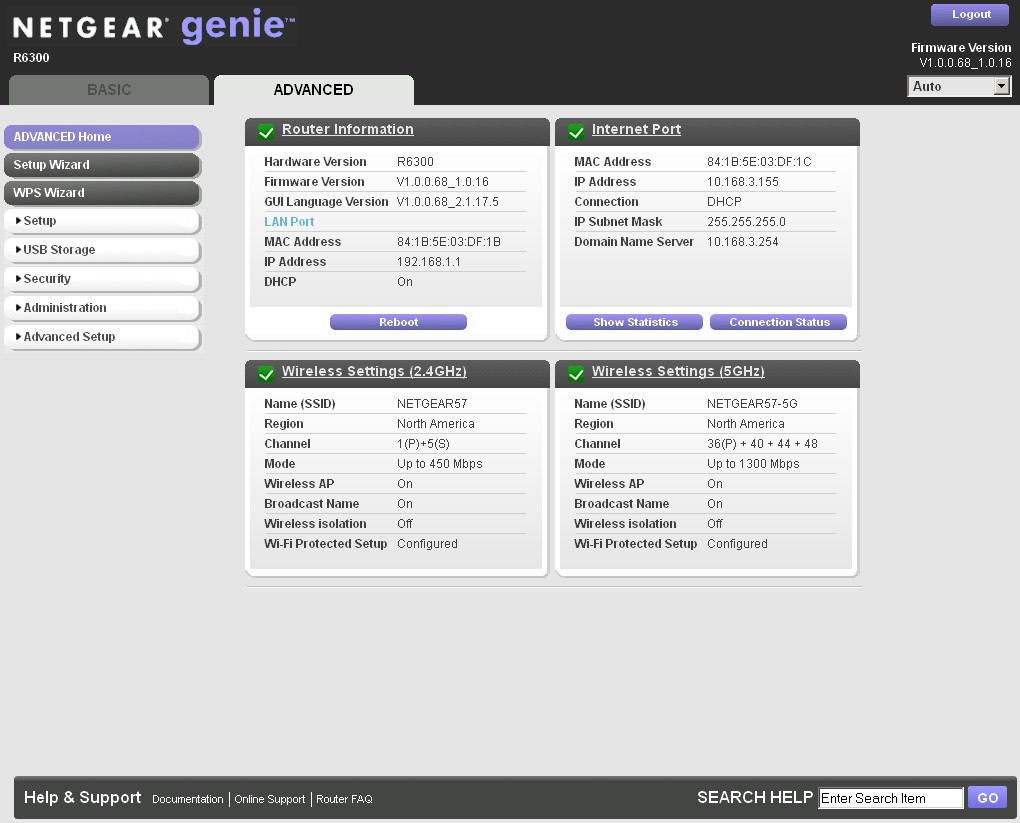
The user interface is the "Genie" first seen on the WNDR3800. Genie does away with installation CDs and should get you up and on the Internet pretty quickly. Since I have a simple DHCP connection to my main router, Genie didn’t have much to do and thankfully got out of the way quickly.
Advanced Home
The V1.0.0.68_1.0.16 firmware version you see in the above screenshot is what I used for testing. I checked on Thursday before testing and it was the latest. But I just happened to check again on Sunday as I write this and there is newer 1.0.0.90 version posted. But among its bugfixes is not the missing Guest wireless mode that some early buyers are pining for (or at least complaining about the lack thereof).
That fix is supposedly coming before the end of this week (June 8) according to NETGEAR, along with a fix for a "variable throughput issue" and "enhanced 802.11ac performance". As noted earlier, once NETGEAR releases that firmware and I have confirmed that there are no other performance tweaks coming in another week or so, I will retest everything for the full review.
Inside
Broadcom was the only vendor with draft 11ac chipsets ready to go to hit this current product launch window. So I expect the R6300’s design is very similar to Buffalo’s WZR-D1800H. But since NETGEAR has suppressed the internal photos for six months (!) until November, I may have to bite the bullet and sacrifice my Amazon return privileges on one of mine to post internal photos.
When I open it up, though, I expect to find a very similar, if not identical, complement of the Buffalo router/bridge key components shown in Table 1.
| Buffalo WZR-D1800H / WLI-H4-D1300 | |
|---|---|
| CPU | Broadcom BCM4706 |
| Switch | Broadcom BCM53125 |
| RAM | 128 MB |
| Flash | 128 MB |
| 2.4 GHz Radio | – BCM4331 – SiGE SE2594L Dual Band 802.11a/b/g/n Wireless LAN Front End (x3) |
| 5 GHz radio | – Broadcom BCM4360 – Skyworks SE5003L 5 GHz, 23dBm Power Amp w/ Power Detector (x3) |
Table 1: Buffalo draft 11ac product component summary
Routing Performance
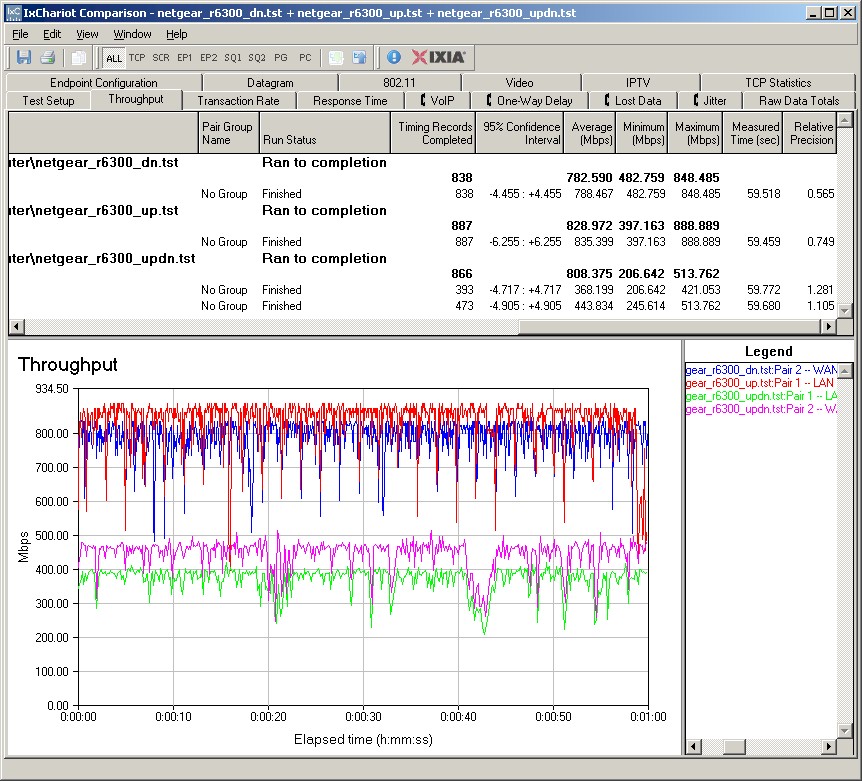
Routing performance for the R6300 using our standard test method is summarized in Table 2, along with Buffalo’s draft 11ac router. The R6300 has higher routing throughput, if that’s important to you. But NETGEAR has kept to its traditional 4,096 limit on simultaneous sessions.
| Test Description | R6300 | WZR-D1800H |
|---|---|---|
| WAN – LAN | 783 Mbps | 566 Mbps |
| LAN – WAN | 829 Mbps | 590 Mbps |
| Total Simultaneous | 808 Mbps | 590 Mbps |
| Maximum Simultaneous Connections | 4096 | 34,925 |
| Firmware Version | V1.0.0.68_1.0.16 | Ver.1.86 |
Table 2: Routing throughput
The IxChariot plot for the routing tests shows generally stable throughput, but with a few pronounced dips.
R6300 Routing throughput IxChariot plot summary
Wireless Performance – Draft 802.11ac
For a look at draft 11ac performance, I used a pair of R6300s running V1.0.0.68_1.0.16 firmware. I had to hunt for it, but finally found the non-WDS bridge mode settings on the Advanced > Advanced Setup > Wireless Settings page under the mysteriously named Use other operating mode checkbox (scroll down near the bottom of the page to see it). I couldn’t use WDS bridging, because, since it doesn’t support WPA2/AES, link rates about 54 Mbps (802.11g) are not available.
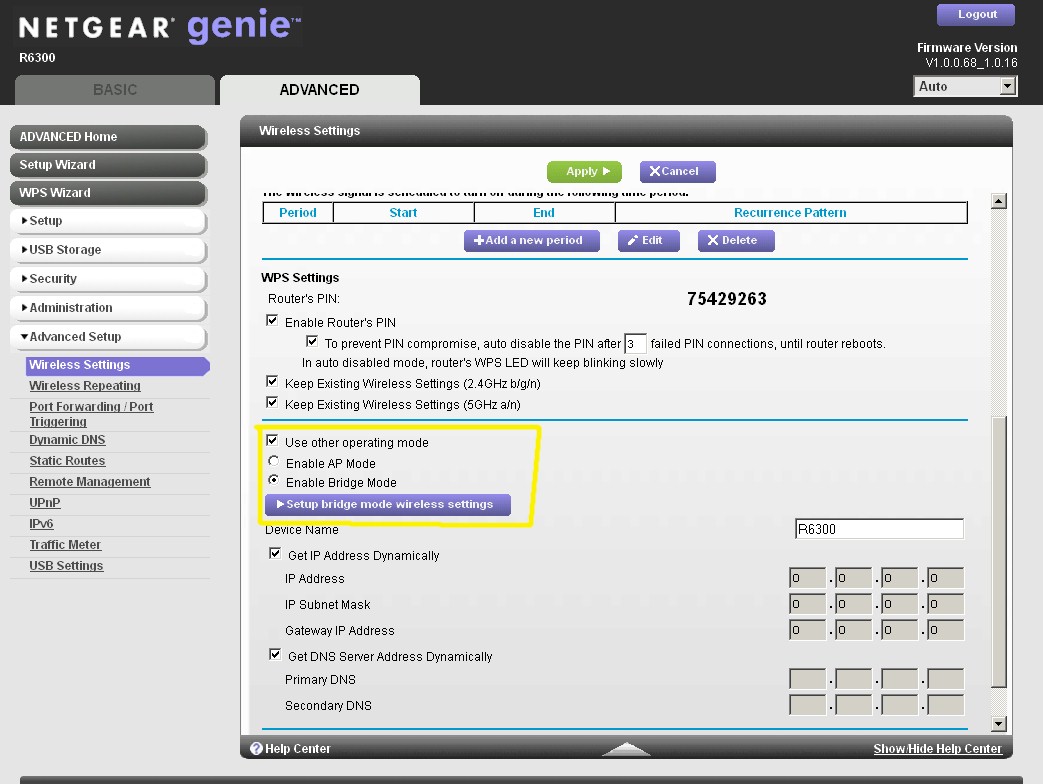
Advanced wireless setttings – Bridge mode
Clicking the Setup bridge mode wireless setttings button brought up the screen shown below. There is no site survey function, so you need to know the SSID of the router you want to connect to. As shown, I used a WPA2/AES secured connection for testing.
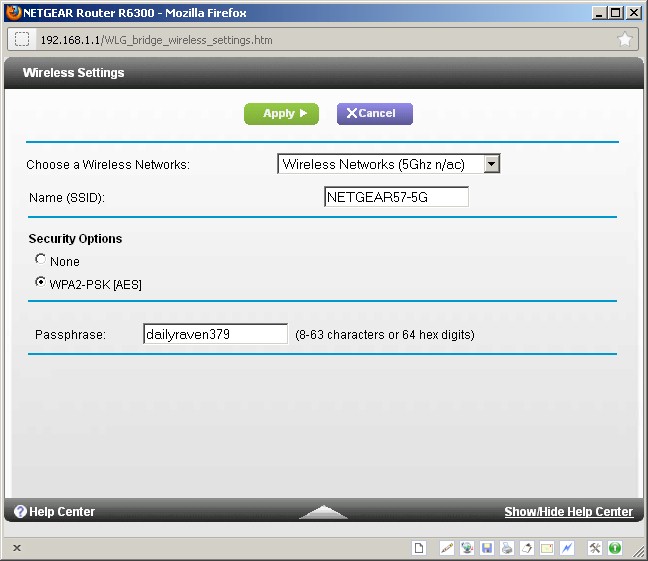
Bridge mode connection settings
I ran tests in my test locations A, C and D. I was not surprised to find no signal in my weakest signal test location F. Since I now have throughput vs. location data for two draft 802.11ac routers in the database, let’s compare! Keep in mind that this isn’t apples-to-apples, since I am not using the same client in both cases.
For downlink, the Buffalo pair appear to maintain higher throughput as signal levels drop.
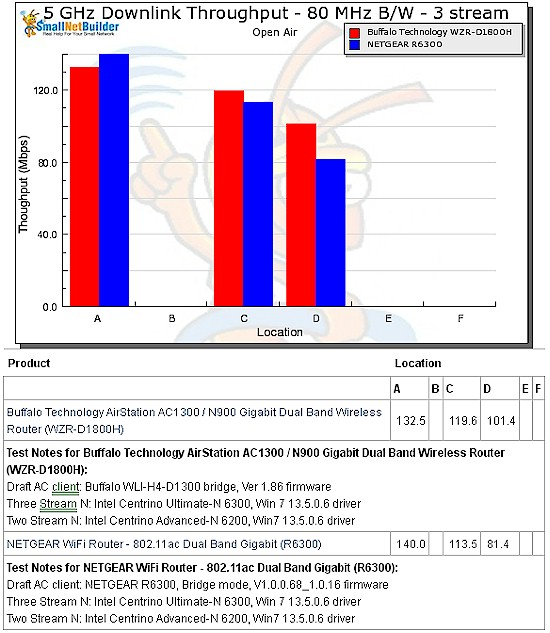
Draft 802.11ac throughput vs. location – NETGEAR R6300 vs. Buffalo WZR-D1800H – downlink
Same appears to go for uplink, especially in Location D.
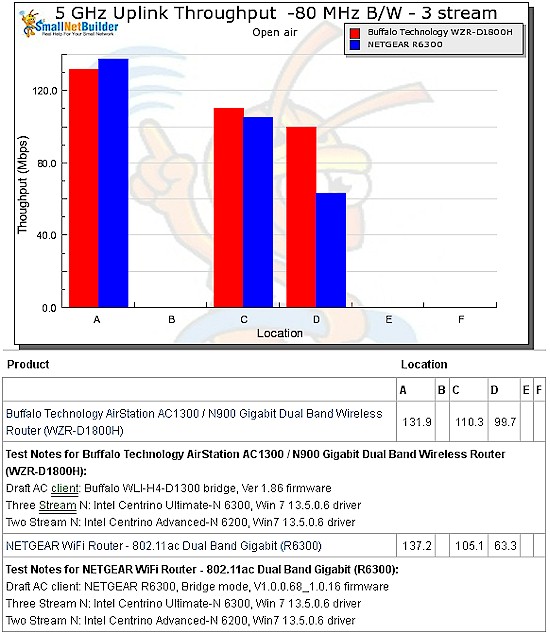
Draft 802.11ac throughput vs. location – NETGEAR R6300 vs. Buffalo WZR-D1800H – uplink
Wireless Performance – more
Here’s the IxChariot plot for downlink Throughput is generally stable, except for those durn big occasional dropouts!
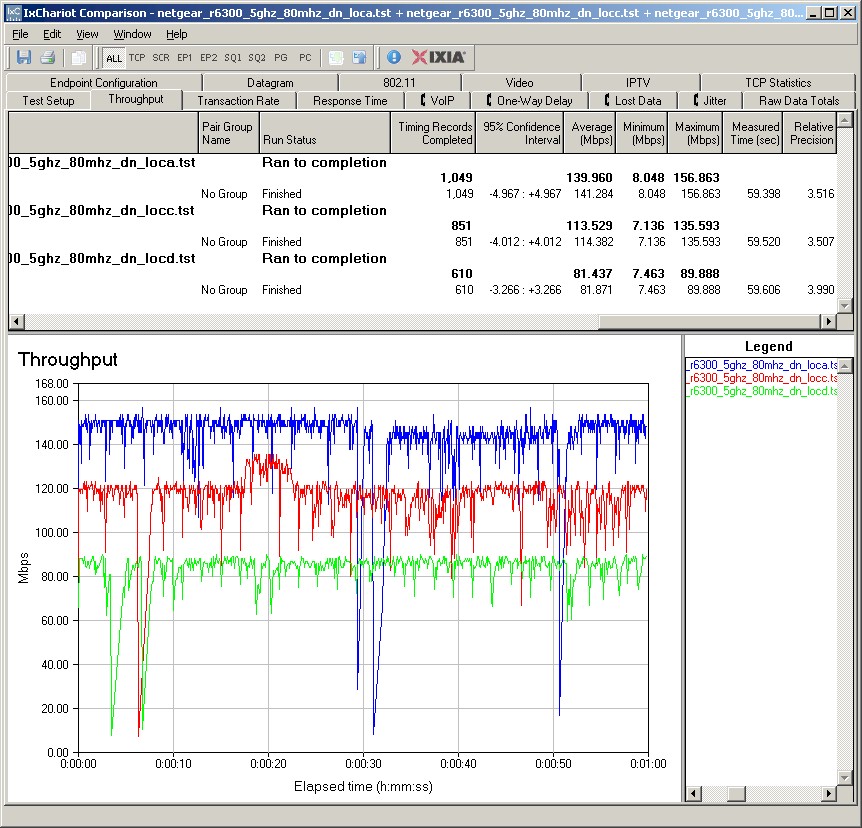
Draft 802.11ac throughput IxChariot plot – NETGEAR R6300 – downlink
Uplink is a little squirrelier, particularly in Location C.
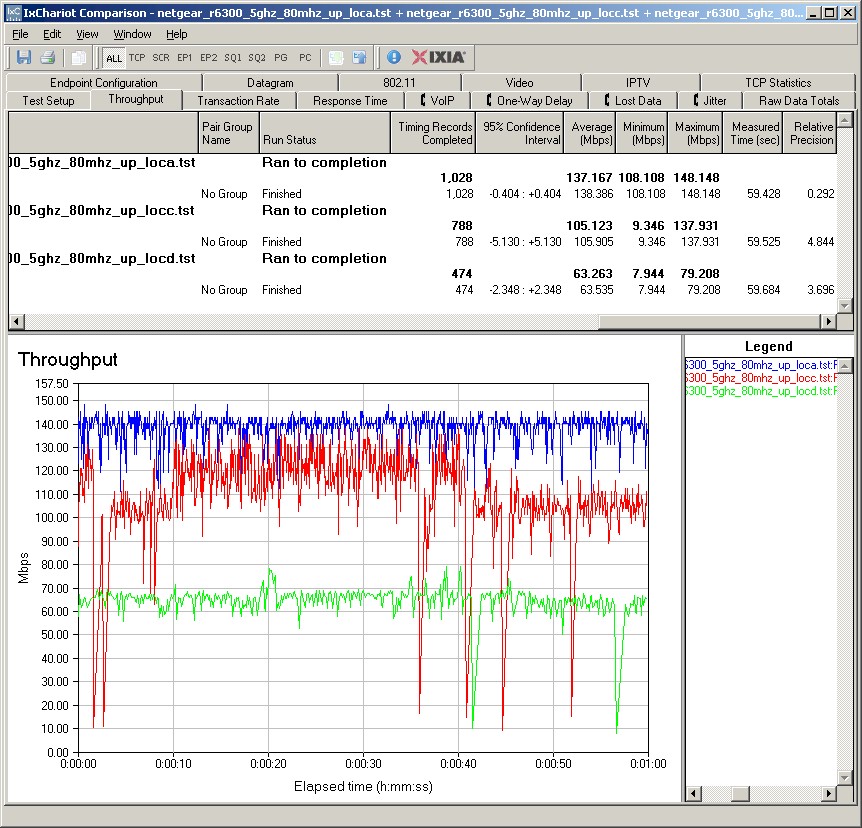
Draft 802.11ac throughput IxChariot plot – NETGEAR R6300 – uplink
Maximum 11ac Throughput
I reran the multi-pair test I used on the Buffalo, to see how much total throughput I could squeeze from the R6300. The plot below shows the R6300 started out higher than the WZR-D1800H, but peaked at 413 Mbps with 5 up/down pairs. Again, this isn’t exactly apples-to-apples. But this should represent best case performance given the pairing of same-vendor designs.
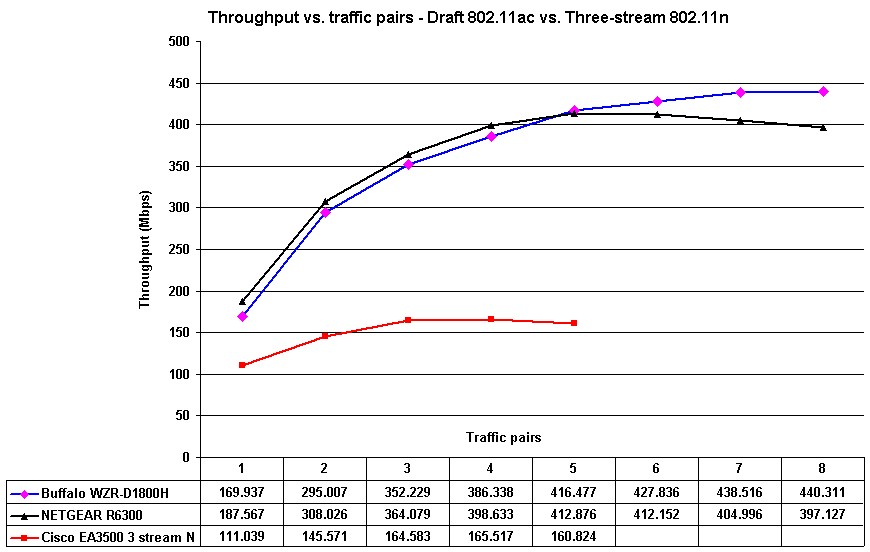
Draft 11ac throughput vs. traffic pairs
Wireless Performance – Two Stream
As I mentioned earlier, I used our standard test method to test the the R6300’s two-stream N wireless performance with our standard two-stream client an Intel Centrino Advanced-N 6200 in a Acer Aspire 1810T notebook running Win 7 Home Premium SP1 (64 bit). 2.4 GHz tests were run on Channel 1 and 5 GHz band tests on Channel 36.
Since I’m going to get to repeat this all over again once NETGEAR releases new firmware, I’m just going to show one particular product comparison and let you run more of your own.
The 2.4 GHz table below compares 2.4 GHz, 20 MHz bandwidth performance for the R6300, Buffalo WZR-D1800H, ASUS RT-N66U and ASUS RT-N56U.
I included the older ASUS router, even though it was tested with my old Intel 5300 two-stream client, mainly because one of the SNB Forum denizens insists that his R6300 provides broader coverage than his old RT-N56U.
In looking at the numbers, however, I can’t see anything in my data that would support his claim for downlink. Uplink shows slightly better numbers from the R6300 than the RT-N56U, but nothing that would provide significantly more range.
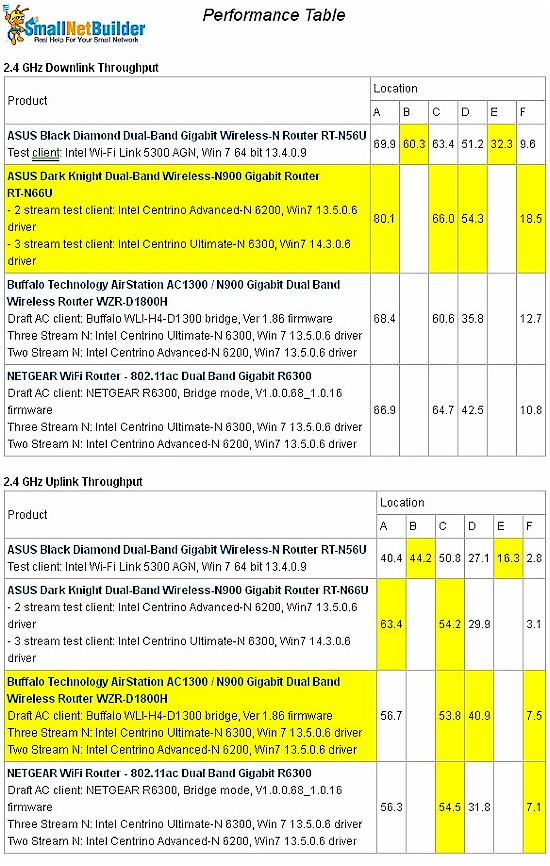
2.4 GHz, 2 stream performance comparison
The 5 GHz table shows even weaker support for better coverage from the R6300 vs. the RT-N56U. Downlink numbers are neck-and-neck in Location D and uplink has the R6300 at only 8 Mbps vs. the ASUS’ 33 Mbps!
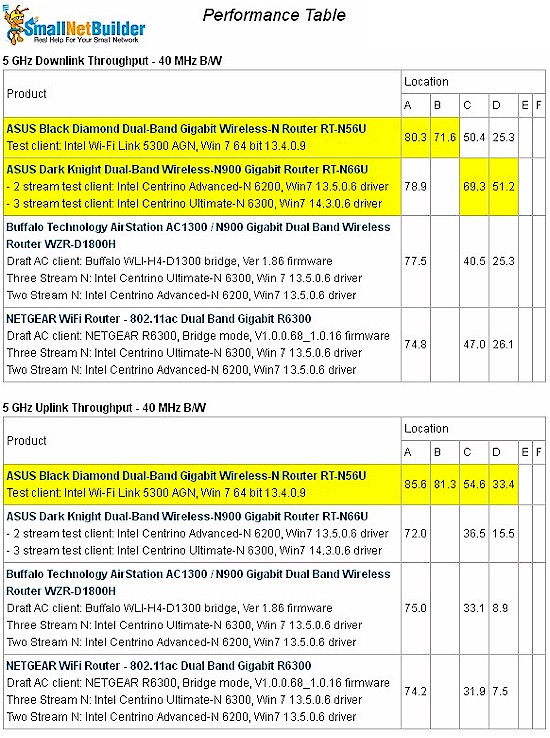
5 GHz, 2 stream performance comparison
Bottom line: Where the same test clients are used, i.e. the RT-N66U and WZR-D1800H, the RT-N66U has an advantage over the two draft 11ac routers only for strongest signal (Location A) downlink in 2.4 GHz and across most 5 GHz downlink locations.
So at least to me, neither the Buffalo nor NETGEAR draft 11ac routers are likely to provide a significant performance advantage (both range and throughput) for two-stream N clients over any other current-generation N router.
Closing Thoughts
With its soon-to-be-upgraded firmware, a pair of NETGEAR R6300’s don’t provide as much total throughput as a Buffalo WZR-D1800H / WLI-H4-D1300 pair. The NETGEAR’s draft 11ac throughput also appears to not hold up as well as the Buffalo’s as signal levels drop.
As for hoping that the R6300 will be a step up from your current draft 11n router, for 802.11abgn clients, I’d say don’t bother, unless you jumped into the 802.11n router game as early as you are considering jumping into the 802.11ac beta test.
We’ll be back for a full review once NETGEAR gets a firmware release out that they deem review-worthy.